Thailand
Seqrite MDM (Enterprise Mobility Management) overview
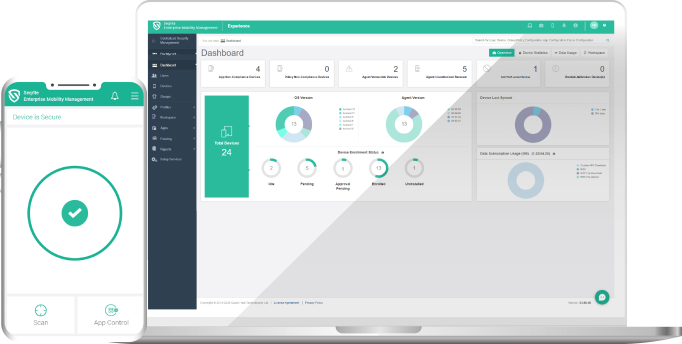
Seqrite MDM, or Enterprise Mobility Management (EMM), is a simple yet powerful tool for managing all of an organization’s Android and iOS mobile devices from one console. Administrators control installed apps, monitor internet usage, track device location, set policies by place and time, and support users through remote device control and file transfer — keeping company data under control even when devices are off the network.
It can be deployed in the cloud or on-premises, supports Android and iOS from the first day of new releases, uses GoDeep.AI technology and raises real-time alerts when policies are violated.
Key features
Manage every device from one console
Enroll devices automatically in seconds, create group-level and role-based administrators, group devices by department or business unit, and track location in real time with history.
Apps, launcher and kiosk mode
Distribute and update apps from the console (in-house or Play Store), allow or deny apps, publish company apps in an internal app store, control app use with a launcher, and lock devices to one or several apps in kiosk mode.
Mobile security and anti-theft
Antivirus protection, remote locate, lock or wipe for lost devices with blocking on SIM change, protection against malicious and phishing sites, allow or block URLs by category or keyword, and scheduled remote scans.
Geo-fencing and data usage
Define usage perimeters by location, Wi-Fi and time, create multiple control groups with policies, and monitor mobile and Wi-Fi data usage with user- and device-level reports.
Reporting and summaries
Standard and custom reports with graphs, audit and admin-action logs, scheduled automatic report delivery and ready-made business report templates.
Remote troubleshooting and file transfer
Control devices remotely to fix problems and cut downtime, and push many file types to users or groups instantly.
Android Enterprise certified
Seqrite is an Android Enterprise service provider that meets Google’s security criteria, supporting smooth device management with timely security updates and patches.
Standard vs Advanced edition
| Feature | Standard | Advanced |
|---|---|---|
| GoDeep.AI | ✓ | ✓ |
| Device management | ✓ | ✓ |
| Application management | ✓ | ✓ |
| Security management | ✓ | ✓ |
| Real-time malware protection | ✓ | ✓ |
| Network data usage monitoring | ✓ | ✓ |
| Launcher mode | ✓ | ✓ |
| Device lock | ✓ | ✓ |
| Call and SMS monitoring | ✗ | ✓ |
| Geo-fence (location, Wi-Fi, time) | ✗ | ✓ |
| Remote device control | ✗ | ✓ |
| Reporting | Basic | Customizable |
| Log retention | 1 month | 3 months |
| Personal-device management (BYOD) | Sold separately | Sold separately |
Specifications on this page are based on Seqrite’s published product datasheet (2024). Editions, versions and features may change — please confirm with our sales team before ordering.
Use cases and FAQ
Where does MDM fit?
Field sales teams using tablets, warehouses and logistics using dedicated devices in kiosk mode, and organizations that must ensure data does not leak when a phone is lost.
Cloud or on-premises?
Both are supported, and our team helps choose the model that fits your policy.
Standard or Advanced?
Advanced adds call and SMS monitoring, geo-fencing, remote device control, customizable reports and 3-month log retention.
Can it manage employees’ personal devices?
Personal-device management (BYOD) is sold separately — see the Seqrite BYOD page.
Why buy and deploy through our team
We are a Thailand-based team providing consulting, supply, installation and after-sales support for Seqrite. We work in Thai and English from requirements assessment, quotation and proof of concept (POC) to administrator training.
Request a quote and demo
Contact our sales team for a free quote and demo. We reply within one business day through the “Get a Quote” page or by phone.