Thailand
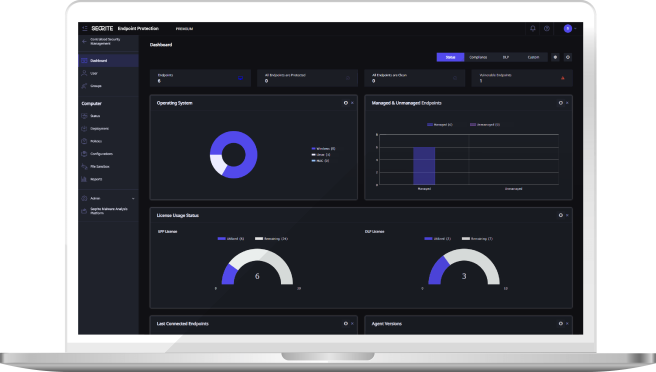
Seqrite Endpoint Protection overview
Seqrite Endpoint Protection (EPP) is a simple yet comprehensive centralized platform that combines anti-ransomware, behavior detection and advanced device control to protect workstations, laptops and servers from today’s sophisticated threats — whether devices sit in the office, at a branch or with staff working from home.
Capabilities range from DLP, vulnerability scanning, patch management and web filtering to IT asset management and enterprise file search, and five editions — SME, Business, Total, Enterprise Suite and EDR — let you match protection to your budget and risk level.
Four reasons organizations choose Seqrite Endpoint Protection
Complete protection and control
Control data, applications and web access from one feature set, including advanced device control, DLP, asset management and application control.
Multi-layered protection
Combines advanced DNA scanning, behavior detection, enterprise file search and ransomware protection, and the product holds certification from independent testers.
Scan and patch vulnerabilities
Finds operating-system and application vulnerabilities and installs missing patches, reducing the chance of malware exploiting them.
Centralized management
An easy web console to monitor, configure and manage devices across the network, with detailed reports and graphical dashboards.
Detailed features
Antivirus and anti-ransomware
Protects against malware using certified engines and blocks ransomware attacks, with automatic backup of selected file types.
Web and network protection
Blocks malicious and phishing sites, filters web categories, schedules internet access, limits Google sign-in to corporate domains and controls YouTube by category. IDS/IPS, firewall, port-scan protection and DDoS alerts add network defense.
Vulnerability scan, patching and file monitoring
Summarizes vulnerabilities by severity, manages Microsoft and non-Microsoft patches centrally, and tracks critical files, alerting admins on copy, rename or delete.
Device control and data loss prevention (DLP)
Set policies for storage, portable and wireless devices and network interfaces, and inspect confidential or custom data shared through removable media, networks or applications.
Application control and asset management
Restrict apps with an allow-list in a Zero Trust approach, use a monitor-only mode that logs without blocking, and see all hardware and software with change tracking.
Central and multi-branch management
Manage devices outside the corporate network via the roaming platform, control multiple branches centrally, manage BitLocker encryption policies including keys and recovery, and get email and SMS alerts.
EDR capabilities in the EDR edition
Quickly query real-time endpoint data, search IoCs automatically through a MISP server daily or weekly, block IoCs in real time and hunt files matching malicious hashes with Enterprise File Search (EFS).
Sandbox, cloud migration and high availability
Send suspicious files to Seqrite’s cloud sandbox without buying analysis hardware, upgrade from version 8.3 or 7.6 to Endpoint Protection Cloud, and use high availability to reduce downtime.
Edition comparison: SME, Business, Total, Enterprise Suite and EDR
| Feature | SME | Business | Total | Enterprise Suite | EDR |
|---|---|---|---|---|---|
| Core protection: antivirus, anti-ransomware, email, IDS/IPS, firewall, phishing, browsing, vulnerability scan, roaming, multi-site | ✓ | ✓ | ✓ | ✓ | ✓ |
| Asset management | – | ✓ | ✓ | ✓ | ✓ |
| Anti-spam | – | ✓ | ✓ | ✓ | ✓ |
| Web filtering | – | ✓ | ✓ | ✓ | ✓ |
| Advanced device control | – | ✓ | ✓ | ✓ | ✓ |
| SIEM integration | – | ✓ | ✓ | ✓ | ✓ |
| Application control (block list / safe list) | – | – | ✓ | ✓ | ✓ |
| Tune-up | – | – | ✓ | ✓ | ✓ |
| File activity monitoring | – | – | ✓ | ✓ | ✓ |
| Patch management | – | – | ✓ | ✓ | ✓ |
| YouTube and Google access control | – | – | – | ✓ | ✓ |
| Disk encryption management (BitLocker) | – | – | – | ✓ | ✓ |
| Quick endpoint search, automated IoC search, real-time IoC blocking, EFS | – | – | – | – | ✓ |
| Data loss prevention (DLP) | – | Add-on | Add-on | ✓ | ✓ |
| File sandboxing | – | Add-on | Add-on | Add-on | Add-on |
Specifications on this page are based on Seqrite’s published product datasheet (2024). Editions, versions and features may change — please confirm with our sales team before ordering.
Architecture and certification
Seqrite’s cloud platform, powered by GoDeep.AI, connects to clients used from home or while traveling, while the on-premises server manages devices on the network and in branch offices, with administrators setting rules and policies from one console.
Seqrite Endpoint Protection is certified as an Approved Corporate Endpoint Protection product for Windows by AV-TEST. Please check AV-TEST’s website for the latest test results.
Use cases for Thai organizations
SMEs replacing consumer antivirus with a centrally managed solution can start with the SME or Business edition.
Factories and multi-branch retailers that must control USB devices and applications can use Total or Enterprise Suite.
Organizations that must show data-protection measures for PDPA compliance can use DLP, BitLocker management and console reports.
Frequently asked questions
Which edition should we choose?
SME suits basic centrally managed protection, Business adds web filtering and device control, Total adds patching and application control, Enterprise Suite adds DLP and disk encryption, and EDR adds endpoint search and response. Our team will recommend one for your size.
Are DLP and sandboxing extra?
Business and Total offer DLP as an add-on, while Enterprise Suite and EDR include it. File sandboxing is an add-on in every edition that supports it.
Are remote employees still protected?
Yes. The roaming platform lets you manage and update devices even outside the corporate network.
Can we migrate from an older version or another antivirus?
Yes. Upgrades from versions 8.3 and 7.6 to Endpoint Protection Cloud are supported, and our team plans phased migration from other antivirus products.
How much does Seqrite Endpoint Protection cost?
Pricing depends on edition, device count and contract length. Request a quote and we reply within one business day.
Why buy and deploy through our team
We are a Thailand-based team providing consulting, supply, installation and after-sales support for Seqrite. We work in Thai and English from requirements assessment, quotation and proof of concept (POC) to administrator training.
Request a quote and demo
Contact our sales team for a free quote and demo. We reply within one business day through the “Get a Quote” page or by phone.